

Business Central meets Microsoft Fabric
Overview
Business Central data can now flow natively into Microsoft Fabric, and it is the answer our clients have been asking for. Microsoft unveiled data mirroring for Dynamics 365 Business Central at FabCon Europe in Barcelona last week, and we have been digging into it ever since.
For years, one question has come up in almost every Business Central project: how do we get our data out for proper reporting and BI? The answers have usually involved APIs, custom exports or third-party connectors that someone has to build, maintain and keep alive. Mirroring changes that approach entirely - it is built into the product, supported by Microsoft, and needs no custom integration work.
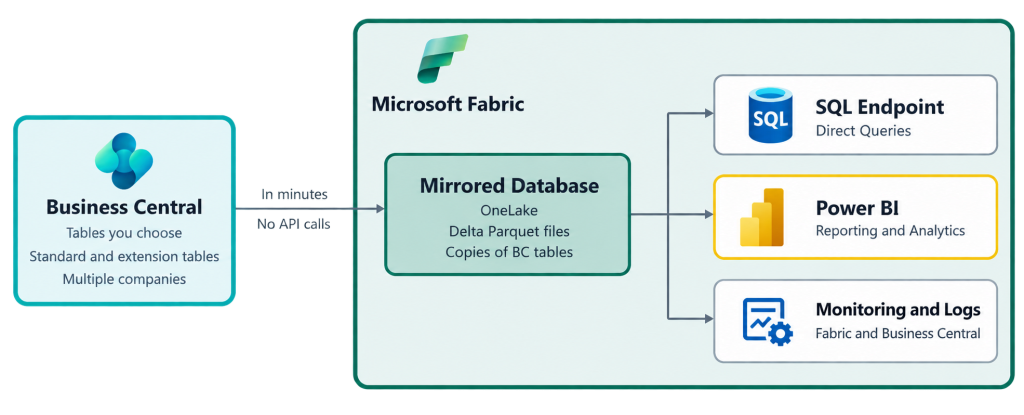
What is Fabric though? Think of it as Microsoft's all-in-one analytics platform. Data engineering, data warehousing, real-time analytics, data science and Power BI all sit together in one place, on top of a single company-wide data lake called OneLake. Once your Business Central data lives there, your reporting, analytics and AI projects all build on the same trusted foundation.
Here is what makes this release stand out:
- Any table, any company. Standard tables and extension tables alike can be mirrored, across multiple companies and per environment.
- Near real time. Changes typically land in Fabric within a few minutes, and deletions come across too.
- No impact on day-to-day operations. Mirroring uses Microsoft's own replication service rather than the Business Central APIs, so it doesn't eat into your API limits or slow down your production database.
- No ceilings found yet. Early testers haven't hit any table, row or volume limits.
- Power BI ready. Microsoft's nine Business Central Power BI apps are getting Fabric-based versions, each with a multi-company option.
The feature arrives in public preview with Business Central 2026 release wave 2 (version 29.x, most likely 29.1) and is available globally.
Setup: as simple as 1, 2, 3.
Getting started takes three steps, and none of them involve writing code.
- Create a mirrored database in Fabric. This is the destination your Business Central data will land in.
- Connect Business Central to Fabric. On the new Microsoft Fabric Setup page in Business Central, enter your Fabric workspace and mirrored database details, then test the connection. Business Central takes care of the integration from there.
- Choose your companies and tables, then start the sync. Pick what you want mirrored and click Start synchronization.
Not sure which tables you need? Configuration packages take the guesswork out. Microsoft already knows which tables its Power BI apps rely on, so those can be loaded as a ready-made package. ISV solutions can ship their own packages too.
Once synced, your tables appear in OneLake exactly as they look in Business Central. Your analysts can query them with plain SQL, as if they were working with a normal database, or point Power BI straight at them.
Our tip: start with the tables that matter most for reporting, such as G/L entries, customer and vendor ledger entries, item ledger entries, and sales and purchase documents. You can always add more later if you need them or the team ask for more reports on other data areas in Business Central.
Monitoring and Logs
You always know what has synced and what hasn't, from whichever side you prefer to work in.
Business Central gives you two new log pages, found under Monitoring on the Microsoft Fabric Setup page:
- Fabric Synchronization Overview - shows one line per sync run, so you can see at a glance that everything is ticking along.
- Fabric Synchronization Details - drills down table by table into exactly what was pushed across.
Both come with ready-made views that take you straight to any errors, without scrolling through all the successful runs. The great thing is that because they are standard Business Central pages, analysis mode works on them too, giving you an instant mini-report.
The same logs are also sent to Fabric and are available through APIs. So if your data team lives in Fabric and rarely opens Business Central, they can monitor the sync from their side using the same tools they use for the data itself.
Licensing
Getting your data into Fabric is free; using it consumes Fabric capacity. Here is how it breaks down.
On the Business Central side: nothing extra. No additional licence and no consumption charge.
On the Fabric side:
- Replication is free. The compute that copies your data into OneLake, and the mirrored database itself, cost nothing and don't use up your capacity.
- Storage is free up to a generous limit. You get 1 TB of free mirroring storage for every capacity unit you buy.
- Querying uses capacity. Running SQL, Power BI reports or other workloads against the data consumes your Fabric capacity at regular rates.
- You need a running Fabric capacity. Mirroring requires an F SKU or an existing P SKU. If the capacity is paused, replication stops.
Fabric capacities come in F sizes (F2, F4, F8, F16, F32, F64 and upwards), where the number is the amount of capacity units. That means even the entry-level F2 includes 2 TB of free mirroring storage, which is plenty for most Business Central databases. For a typical project with a handful of companies and Power BI on top, F2 is the sensible starting point, and you can scale up as your reporting grows.
Want to try before you commit? A Fabric trial capacity lets you explore mirroring at no cost. Microsoft has also announced a new pay-as-you-go F0 SKU in public preview, ideal for a proof of concept before moving to F2 for production. Actual pricing depends on your region and SKU, so check the Fabric pricing page or ask us for a tailored estimate.
Next Steps
This is one of the most significant analytics releases Business Central has seen. It removes the cost and complexity of custom data pipelines and opens the door to modern reporting, data warehousing and AI on your ERP data.
We are already exploring mirroring and helping clients plan their move to Fabric. Whether you want a quick proof of concept, advice on sizing your Fabric capacity, or a full Power BI reporting solution, get in touch and let's talk about what your data could do for you.
Contact us via hello@deltatechology.co.uk if you would like to discuss the above.